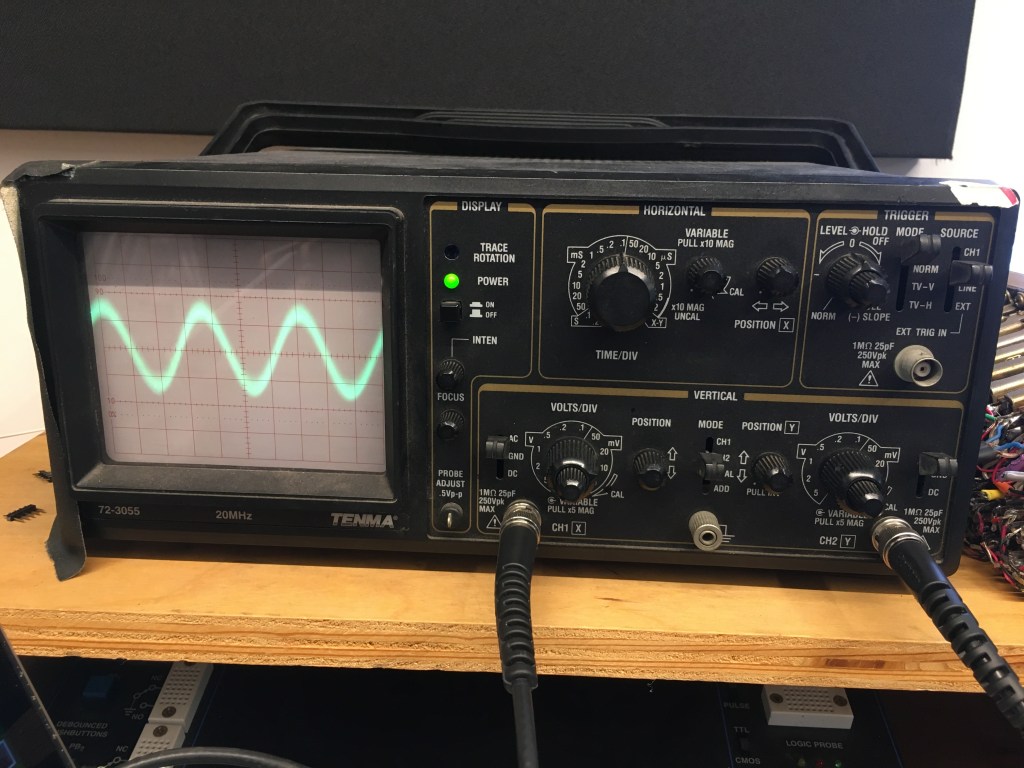
In the display section of the Oscilloscope, there is the power button, which turns the machine on or off, and the focus / intensity knobs, which control how thin / thick the wave is and how bright it is, respectively.
In the horizontal section, you can control the waveform’s horizontal center with the knob furthest right. The large knob is the the time/div knob, which changes the horizontal width of the waveform by affecting the amount of time represented by each mark on the graph.
Below is the vertical section. You can control the vertical height of the waveform with the volts/div knobs for each channel. You can also control the wave’s vertical center with the y-position knob and the type of current going through each probe, be it AC, DC, or ground.
The trigger controls on the top right-hand corner allow you to choose when the wave is displayed and which source is controlling that. The level-hold knobs are what allow you to focus on the wave in order to measure it.
The probes that stem from the vertical section each have two connectors that can be attached to two different points on the circuit. In. the video above, there are two different sine waves, and one’s amplitude is being affected by the potentiometer on the circuit. The potentiometer changes the resistance on the signal, going from about 1 Ω to 10 kΩ., with 1 Ω allowing 100% of the signal to come through and 10 kΩ not allowing anything at all.
 Sean Thornton - Analog Electronics